


Tóm Tắt Nội Dung Bài Viết
The IELTS (International English Language Testing System) is one of the world’s most popular English proficiency tests, recognized by over 11,000 educational institutions, government agencies, and employers across more than 140 countries. Today, in addition to the traditional paper-based format, candidates can choose to take the IELTS on a computer (Computer-delivered IELTS), which offers several distinct advantages.
This article provides a comprehensive guide to the computer-delivered IELTS exam organized by IDP (International Development Program), covering everything from the basics, benefits, and test structure to effective test-taking tips and useful preparation materials.
For those who aren’t aware: Starting March 29, 2025, the paper-based IELTS format will be phased out, leaving computer-delivered testing as the only option.
Part 1: Overview of the Computer-Delivered IELTS Exam
From March 29, the IELTS exam in Vietnam will transition entirely to a computer-delivered format. This change is designed to provide candidates with a faster, more efficient, and more convenient testing experience compared to the paper-based version. While computer-delivered testing is no longer a new concept, many candidates still feel anxious or uncertain about this format. Follow these tips from IDP and ECE to conquer the computer-delivered IELTS with confidence!
1.1. What is Computer-Delivered IELTS?
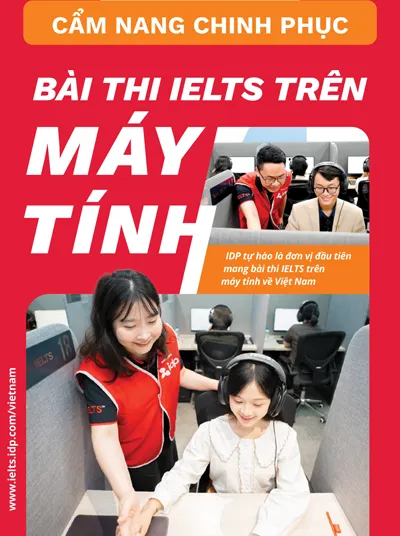
Computer-delivered IELTS is a format where candidates complete the Listening, Reading, and Writing sections on a computer at an official IDP test center. The Speaking section remains a face-to-face interview with an examiner, ensuring an accurate and objective assessment of your communication skills. This format is identical to the paper-based test in terms of content, structure, difficulty, question types, scoring, and security protocols.
1.2. Advantages of Computer-Delivered IELTS
- Fast results: Receive your results in just 1–3 days (compared to 13 days for the paper-based format).
- Flexible scheduling: IDP offers more test dates and sessions throughout the week, including weekends, with up to 7 days a week and 2 sessions per day.
- User-friendly interface: The test interface is intuitive, easy to use, and includes various support features.
- Modern testing environment: Test rooms are equipped with high-performance computers and world-class noise-canceling headphones.
- No handwriting worries: Eliminates concerns about poor handwriting.
- Reduced errors: Features automatic spell-check (can be disabled) and automatic word count.
- IELTS One Skill Retake: This is one of the biggest benefits available.
1.3. Who Should Take the Computer-Delivered IELTS?
- Candidates who need their IELTS results quickly for study abroad, job applications, or immigration.
- Candidates who are comfortable using computers and are proficient at typing.
- Candidates who prefer a modern, convenient testing experience with less pressure.
- Candidates who want more options for test dates and sessions.
- Candidates who want the opportunity to improve a single skill score via IELTS One Skill Retake.
Part 2: Test Structure and Procedure for Computer-Delivered IELTS
2.1. Test Structure
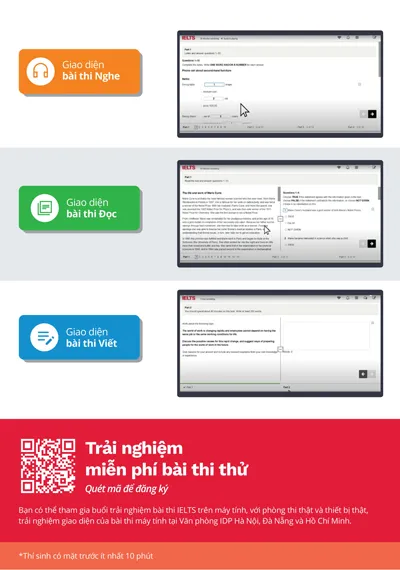
The structure of the computer-delivered IELTS is exactly the same as the paper-based test, covering 4 skills:
-
Listening (30 minutes + 2 minutes check time): 4 parts, 40 questions. Question types include: multiple choice, matching, plan/map/diagram labeling, form/note/table/flow-chart/summary completion, and sentence completion.
Note: On the computer, you only have 2 minutes to review your answers (instead of 10 minutes as in the paper-based test). Make sure to enter your answers directly into the computer as you listen. There is no example section; the first question is the start of the test.
- Reading (60 minutes): 3 reading passages, 40 questions. Question types include: multiple choice, identifying information (True/False/Not Given), identifying writer’s views/claims (Yes/No/Not Given), matching information, matching headings, matching features, matching sentence endings, sentence completion, summary/note/table/flow-chart/diagram completion, and short-answer questions.
Note: The screen is split in half, with the reading passage on one side and the questions on the other, making it easy to look up and cross-reference information.
-
Writing (60 minutes): 2 writing tasks.
-
Task 1 (at least 150 words): Write a report describing or summarizing information from a graph, table, chart, or diagram (Academic) or write a letter (General Training).
-
Task 2 (at least 250 words): Write an essay presenting your opinion or argument on a specific issue.
-
Note: There is an on-screen countdown timer and an automatic word counter to help you manage your time and ensure you meet the word count requirements.
-
Speaking (11–14 minutes): A face-to-face interview with an examiner, consisting of 3 parts:
- Part 1: Introduction and questions on familiar topics.
- Part 2: A long turn on a given topic (1 minute preparation time).
- Part 3: A deeper discussion related to the topic in Part 2.
2.2. Test Procedure
- Check-in: Arrive at the IDP test center at least 30 minutes before your test time. Present your valid ID card or passport. IDP staff will explain the test regulations, conduct security checks (metal detection), and guide you to store personal belongings in a locker (only your ID is allowed in the test room).
- Test Room:
- Listen to the test regulations (in English).
- Receive your Log-in sheet (containing personal details, username, and password).
- Log in to the computer, verify your personal information, and test your headphones.
- Complete the test in order: Listening, Reading, Writing (no breaks between sections).
- If you have any questions during the test, raise your hand to ask an invigilator.
- When time is up, the computer will automatically save your work and log you out. The invigilator will collect your Log-in sheet.
- Speaking: Usually takes place on the afternoon of the same day (or vice versa, depending on the schedule). The Speaking test procedure is the same as the paper-based version.
- Special Note:
- You are not permitted to leave the room to use the restroom during the test.
- In the event of a power outage, computers are equipped with an Uninterruptible Power Supply (UPS) to maintain operation for several minutes, and IDP’s backup generator system will be activated to ensure the test is not interrupted.
Part 3: Support Features on the Computer
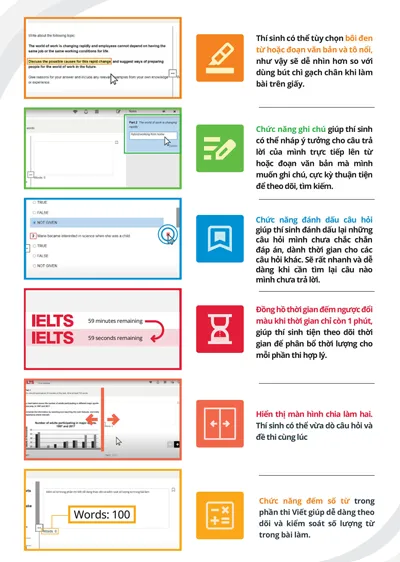
IDP provides an optimized, user-friendly computer-delivered IELTS interface with several features to support candidates:
-
Highlight: Highlight words, phrases, or important paragraphs in the reading passage or questions to track and remember them easily. Action: Click and drag your mouse to select the text you want to highlight.
-
Note: Jot down ideas, keywords, or any information you want to remember regarding a question or passage. Action: Right-click on the text, select “Note,” and enter your content.
-
Review: Mark questions you are unsure about or want to revisit later. Action: Click the flag icon next to the question number.
-
Copy/Paste: Copy and paste text (only available in the Writing section). Action: Use Ctrl+C (copy) and Ctrl+V (paste), or right-click and select “Copy” and “Paste.”
-
Adjust font size: Increase or decrease the font size to suit your vision and preference. Action: Click the “Settings” icon in the top right corner and select “Font size.”
-
Change screen colors: Change the background and text colors (e.g., yellow text on a black background) to reduce eye strain and improve focus. Action: Click the “Settings” icon and select “Screen colors.”
-
Help: Access instructions on how to use features and information about the test. Action: Click the question mark (?) icon in the top right corner.
-
Timer: Displays the time remaining for each section. The timer will turn red when there are 5 minutes and 1 minute left as a reminder.
-
Word count: Automatically counts the words in your essay (Writing section), helping you easily manage the length of your response.
-
Navigation Bar: Located at the bottom of the screen, allowing you to move between questions quickly. Answered questions will be underlined.
Part 4: Effective Tips for Computer-Delivered IELTS
- Get familiar with the interface: Before the test day, spend time practicing on IDP’s computer-delivered IELTS mock tests or other resources to get used to the interface and features.
- Practice typing: Fast and accurate typing skills will help you save time during the Writing section.
- Use support features: Take advantage of the highlight, note, and review features to manage your time and work effectively.
- Manage your time: Allocate time reasonably for each section and question. Do not spend too much time on a single difficult question.
- Read instructions carefully: Read the instructions for each section and question thoroughly to avoid mistakes.
- Review your work: Use the time at the end of each section to check your answers, spelling, and grammar.
- Stay calm: If you encounter difficulties, take a deep breath, stay calm, and continue with the test.
- Use Copy/Paste in Writing: To save time, you can copy useful phrases, sentences, or grammatical structures from the Reading section or Task 1 to use in Task 2 (if appropriate). However, be careful not to copy verbatim; you must paraphrase them in your own words.
- Use the Log-in sheet as scratch paper: Use the provided Log-in sheet to jot down main ideas, keywords, and outlines for the Writing section, or important information during the Listening and Reading sections.
- Don’t overuse Highlight and Note: Only highlight or note truly important information to avoid cluttering your screen and losing focus.
Part 5: IDP Computer-Delivered IELTS Preparation Materials
IDP offers a variety of free and paid computer-delivered IELTS preparation materials to help you prepare for the exam:
- IELTS Masterclass: An online course taught by IDP IELTS experts, including video lectures, practice exercises, and mock tests.
- IELTS Progress Check: A computer-delivered IELTS mock test with scoring and detailed feedback from an examiner.
- IELTS Support Tools: A suite of IELTS preparation tools, including exercises, video tutorials, and test-taking tips.
- IELTS Prepare Hub: A website aggregating all official IDP IELTS preparation materials: articles, videos, webinars, expert reviews, courses, practice tests, and more.
- IELTS Podcasts: Provides advice and answers to common IELTS-related questions.
- IELTS preparation package worth 1,400,000 VND when registering for the test at IDP: Includes an online IELTS Master course, IELTS 4-skill tips Ebook, videos on common mistakes, sample tests, guides, partner offers, and more.
- Online pre-test guidance sessions.
- IELTS thematic workshops.
Part 6: Find an IDP Computer-Delivered IELTS Test Center
IDP has many computer-delivered IELTS test centers across the country, providing convenience for candidates:
- Ho Chi Minh City:
- HCMC1: 161 Hai Ba Trung, Vo Thi Sau Ward, District 3
- HCMC3: 02 Nguyen Thi Thap, Him Lam Residential Area, District 7
- HCMC4: 226 Le Van Sy, Ward 10, Tan Binh District
- Hanoi:
- HN1: 15-17 Ngoc Khanh, Ba Dinh District
- HN2: TD Building, 28 Phan Boi Chau, Hoan Kiem District
- National Economics University: 207 Giai Phong, Dong Tam, Hai Ba Trung District
- IELTS Fighter English Center – Dong Da: 214 Truong Chinh, Nga Tu So, Dong Da District
- Da Nang: 10 Ngo Gia Tu, Hai Chau District
- Hai Phong: Pec International English Center – Nguyen Duc Canh Branch: 119 Nguyen Duc Canh, Hai Phong
- Dong Nai: VMG English Center – Dong Nai 2 Branch: 1209 Pham Van Thuan, Bien Hoa
- Vung Tau: Hanex English Academy: 85 Nguyen Thai Hoc, Ward 7, Vung Tau City, Ba Ria – Vung Tau
- Phan Thiet: INNO English Center Phan Thiet: 189 Ton Duc Thang, Phu Thuy, Phan Thiet City, Binh Thuan
- Gia Lai: Viet Anh Foreign Language Center – VES: 30 Tran Quang Khai, Pleiku City, Gia Lai
- Can Tho: Gia Viet English Center: 39 Mau Than Street, Xuan Khanh Ward, Ninh Kieu District, Can Tho City
- Vinh: IELTS Fighter English Center – Vinh: 74 Hermann, Hung Phuc, Vinh City, Nghe An
- Thanh Hoa: IELTS Champions Foreign Language Center – CS3: HH08 Vinhomes Star City, Thanh Hoa
- Ha Long: PISA English Center – A2-17, Monbay Residential Area, Hong Hai Ward, Ha Long City
Part 7: Frequently Asked Questions (FAQ) About Computer-Delivered IELTS
- Can I take notes during the computer-delivered IELTS test?
Yes. You can take notes in two ways:
“Note” feature on the computer: Right-click on the text you want to annotate and select “Note.”
Log-in sheet: You can write notes on the log-in sheet provided at the start of the test. This sheet will be collected after the test ends.
-
Can I take all parts of the test on the same day?
Yes. The Listening, Reading, and Writing sections are taken consecutively on the same day. For the Speaking section, when taking the computer-delivered IELTS with IDP, you will take it on the same day, either before or after the other three sections.
-
What is the difference between paper-based and computer-delivered IELTS?
The main difference is the format. With the computer-delivered test, you complete the Listening, Reading, and Writing sections on a computer, whereas with the paper-based test, you use paper. The test structure, difficulty, question types, and scoring are exactly the same. The computer-delivered format offers the advantage of faster results (1–3 days compared to 13 days) and a more flexible schedule. The Speaking section is always conducted face-to-face with an examiner.
-
What should I bring on test day?
You must bring the passport or national ID card you used to register for the test. The test center will provide pencils, erasers, and scratch paper (if needed). You are not permitted to bring any other personal items into the test room, including mobile phones, smartwatches, pagers, or other electronic devices. All personal belongings must be left outside the test room in a secure area or locker. If you bring a phone or electronic device into the test room, your test will be disqualified.
Computer-delivered IELTS is an excellent choice for those who want a modern, convenient testing experience with fast results. With thorough preparation, familiarity with the interface and support features, and by utilizing IDP’s preparation materials, you can confidently conquer the computer-delivered IELTS and achieve your desired score. Good luck!





 Khai giảng Khóa học Hè cực HOT.
No comments yet!