


Tóm Tắt Nội Dung Bài Viết
The IELTS (International English Language Testing System) is a prestigious, globally recognized English proficiency exam that opens doors to international study and career opportunities. Once you have completed the test, checking your IELTS results is a crucial step in evaluating your performance and planning your next academic or professional moves.
This article provides a detailed guide on how to check your IELTS results through both IDP and the British Council (BC), how to collect your Test Report Form (TRF), the re-marking process, frequently asked questions, information on score reporting services, and the validity period of your results.
1. When will my official IELTS results be available?
The time it takes to receive your IELTS results depends on the test format you chose:
- Computer-delivered IELTS: Results are available within 3–5 days of your test date.
- Paper-based IELTS: Results are available 13 days after your test date.
Important Note: Effective March 29, 2025, the paper-based IELTS format will be completely phased out. This means all candidates will take the computer-delivered IELTS, and results will be available faster, within just 3–5 days.
2. How to check your IELTS results online
Checking your IELTS results online is currently the most popular, fast, and convenient method. Both IDP and the British Council provide online portals that allow candidates to easily access their scores with just a few simple steps.
2.1. Checking IDP IELTS results
IDP offers a straightforward and user-friendly online system for checking IELTS results. Follow these detailed steps:
- Step 1: Visit the official IDP IELTS website:
You need to visit the official IDP IELTS website for the region where you registered for your test. Typically, the link will look like this: https://www.ielts.idp.com/vietnam/ (for Vietnam).
-
Step 2: Look for “Check Your Results”
On the homepage, you will see a section labeled “Check Your Results,” “View Results,” or a similar option. Click on it.
-
Step 3: Log in to the portal
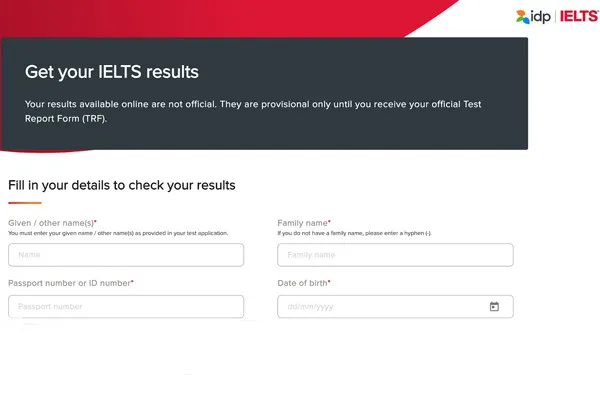
You will be redirected to the login page. Here, you must enter the exact details you used to register for the test. Typically, you will need to provide the following:
-
- Given Name(s): Your first and middle name (as registered). Use uppercase, no accents.
- Family Name / Surname: Your last name (as registered). Use uppercase, no accents.
- Passport Number / ID Number: The passport or national ID number you used during registration.
- Date of Birth: Your date of birth in dd/mm/yyyy format.
-
Step 4: View your results:
Once logged in, you will see your detailed IELTS results, including:
-
- Overall Band Score: Your total score (the average of the 4 skills, rounded according to IELTS rules).
- Listening: Your Listening score.
- Reading: Your Reading score.
- Writing: Your Writing score.
- Speaking: Your Speaking score.
- Test Date: The date you took the test.
- Test Centre: The center where you took the test.
Notes for checking IDP IELTS results:
- Accuracy: Ensure you enter your personal details exactly as they appear on your registration, especially your name, ID/passport number, and date of birth. Even a minor error can prevent you from accessing your results.
- Internet Connection: Check your internet connection to avoid interruptions during the process.
- Reference Only: Online results are for reference only and allow you to see your scores early. You will still need your official Test Report Form (TRF) for study abroad, immigration, or job applications.
- Save your info: It is recommended to take a screenshot or write down your results for future reference.
2.2. Checking British Council (BC) IELTS results
Similar to IDP, the British Council provides an online system for checking BC IELTS results with simple steps. Here is the detailed guide:
-
Step 1: Visit the British Council Test Taker Portal:
Go to the British Council Test Taker Portal: https://ieltsregistration.britishcouncil.org/test-taker-portal
- Step 2: Log in to your account:
Use the login credentials you created when registering for the test to access your personal account. These typically include:
-
- Email Address: The email address you used to register and create your account.
- Password: The password you set for your account.
-
Step 3: Go to the “Results” section:
Once logged in, you will see your account dashboard. Find and click on the “Results” section to view your scores.
- Step 4: View your results:
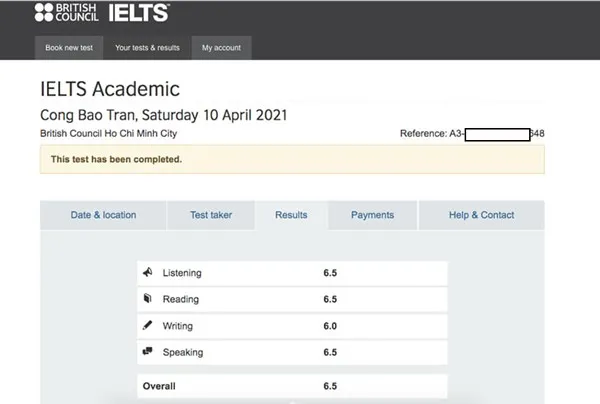
The system will display your detailed IELTS results, including:
-
- Overall Band Score: Your total score (the average of the 4 skills, rounded according to IELTS rules).
- Listening: Your Listening score.
- Reading: Your Reading score.
- Writing: Your Writing score.
- Speaking: Your Speaking score.
- Test Date: The date you took the test.
Notes for checking BC IELTS results:
- Correct Login Info: Ensure you enter the correct email and password. If you have forgotten your password, use the “Forgot Password” function to recover it.
- Stable Internet: Ensure your internet connection is stable for a smooth process.
- Reference Only: Online results are for reference only. You will still need your official Test Report Form (TRF) for official purposes such as study abroad applications, visas, immigration, or employment.
- Save your info: Take a screenshot or write down your results for your records.
3. Receiving your official Test Report Form (TRF)
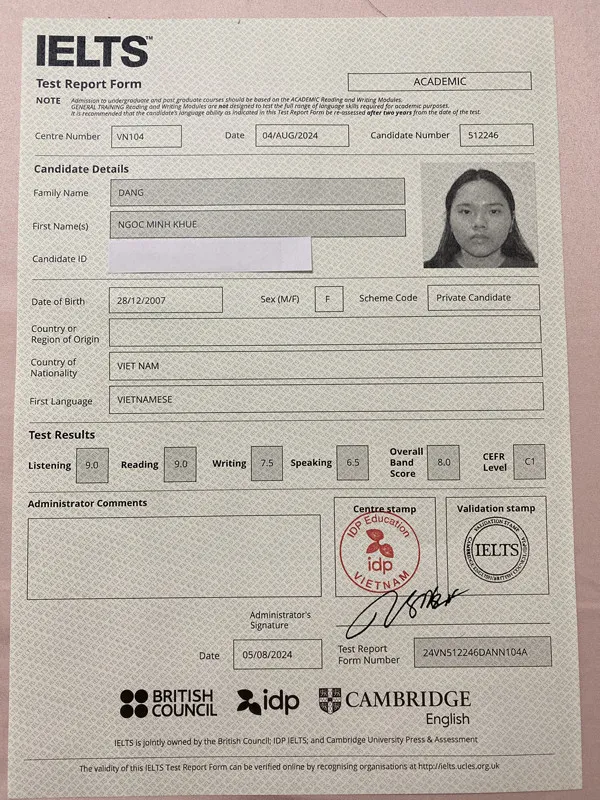
The official Test Report Form (TRF) is a vital document with legal standing that proves your IELTS results. You will need the TRF for university applications, visas, immigration, and job applications. The TRF contains your personal details, test date, test location, and scores for each skill, as well as your overall band score.
3.1. Receiving your TRF from IDP
- In-person collection: 13 days after your test date (for paper-based) or 3–5 days (for computer-delivered), you can visit the IDP center where you registered to collect your TRF. Remember to bring the original ID/Passport you used during registration to verify your identity.
IDP Office Addresses:
-
- Hanoi: 28 Phan Boi Chau, Hoan Kiem District
- HCMC: 161-161A Hai Ba Trung, District 3
- Da Nang: 10 Ngo Gia Tu, Hai Chau District
- Authorization: If you cannot collect it yourself, you may authorize someone else. You must fill out the IDP “Authorization Letter” and email it to the test center before collection. Once confirmed, the authorized person must bring their original ID (National ID/Passport) to collect it on your behalf. The information on their ID must match the authorization letter.
- Postal delivery: IDP offers a paid postal service to send your TRF. You should register for this service when booking your test or contact IDP afterward. You will need to provide a correct mailing address and pay the shipping fee. Delivery time depends on the postal service and your location.
Support via phone and email:
For quick assistance, you can contact the Hotline at 1900 6955 or the following emails:
IELTS Hanoi: ielts.hanoi@idp.com
IELTS HCMC: ielts.hcmc@idp.com
IELTS Da Nang: ielts.danang@idp.com
Result notification: On the day results are released, IDP typically sends an SMS notification for you to collect your official TRF.
3.2. Receiving your TRF from the British Council (BC)
- In-person collection: 13 days after your test date (for paper-based) or 3–5 days (for computer-delivered), you can visit the BC office where you registered to collect your TRF. Remember to bring the original ID/Passport you used during registration for verification.
BC Office Addresses:
Hanoi: 3rd Floor, Lancaster Luminaire Building, 1152-1154 Lang Road, Lang Thuong Ward, Dong Da District.
HCMC: 1st Floor, Viettel Building, 285 Cach Mang Thang Tam, Ward 12, District 10.
Working Hours:
Monday – Friday: 8:30 – 19:00
Saturday: 8:30 – 12:00 and 13:30 – 16:30
Note on storage: Your TRF will be kept at the Customer Service desk for 3 months from the date results are released. After this period, if you wish to collect it, you must notify the British Council at least 3 working days in advance.
- Authorization: To authorize someone else to collect your TRF, fill out the “Authorization Form” (available on the BC website), ensuring the signature matches the one you provided on your test day. Scan or take a photo of the form and email it to BC (exams.hanoi@britishcouncil.org.vn for Hanoi or exams.hcmc@britishcouncil.org.vn for HCMC). The authorized person must present their original ID/Passport when collecting.
- Postal delivery: BC offers a paid postal service to send your TRF. You should register for this service when booking your test or contact BC afterward. Provide a correct mailing address and pay the shipping fee. Delivery time depends on the postal service and your location.
Important notes regarding the TRF:
- Only one original: You are issued only one original TRF. Keep it in a safe place, as you will not be issued another original if it is lost or damaged. Losing your original TRF can cause significant issues for your plans.
- Requesting copies: You can request IDP or BC to send copies of your TRF (with limits, usually up to 5 for universities and 2 for immigration authorities) to institutions, schools, or government agencies. You must provide the details of these organizations and pay a service fee (fees may vary based on IDP/BC policies).
- Validity: The TRF is valid for 2 years from the test date. After this, it will no longer be accepted by institutions. You will need to retake the IELTS if you require a valid certificate after this period.
- Check your details: As soon as you receive your TRF, carefully check your personal information, test date, location, and especially your scores for any errors. If you find any mistakes, contact IDP or BC immediately for support.
4. IELTS Enquiry on Results (EOR)
If you are dissatisfied with your IELTS results, particularly in the Writing or Speaking sections, you have the right to request an Enquiry on Results (EOR). This is a process where your test is re-marked by a different, senior examiner who is unaware of your original scores.
4.1. The EOR process at IDP and BC
The EOR process at IDP and BC is essentially the same and includes the following steps:
-
Step 1: Submit an EOR application:
You must fill out an Enquiry on Results Form. This form can be downloaded from the official IDP/BC website or obtained at their offices. You must submit this form at the center where you registered within 6 weeks of your test date. Note that the 6-week deadline is calculated from the test date, not the date results were released.
-
Step 2: Pay the EOR fee:
You must pay the EOR fee. This fee currently ranges from 2,200,000 to 2,310,000 VND (subject to change based on IDP/BC policies).
-
Step 3: Wait for the results:
EOR results will be available within 2–21 days (depending on the number of skills you requested to be re-marked and the volume of requests at that time). During this period, your original results will be temporarily hidden on the online portal.
4.2. Important notes for EOR:
- Full or partial re-mark: You can request a re-mark of the entire test (all 4 skills) or just specific skills (e.g., only Writing). Consider this carefully before deciding.
- Refund if score increases: The EOR fee will be fully refunded if your score changes (increases) after the re-mark. If the score remains the same or decreases, the fee will not be refunded.
- Final decision: The EOR result is final and cannot be appealed further. Whether your score increases, decreases, or stays the same, you must accept the outcome.
- New TRF: If your score changes, IDP or BC will issue a new TRF with the updated score. You will need to return your old TRF when receiving the new one.
- Consider carefully: Before deciding on an EOR, consult with an IELTS teacher (if possible) to objectively assess the likelihood of your score changing.
5. IELTS score reporting services from IDP and BC
Both IDP and BC offer services to send your IELTS TRF directly to universities, educational institutions, government agencies, or employers you designate. This service saves you time and effort, ensuring your TRF is delivered securely and accurately.
5.1. IDP IELTS score reporting service
- Additional TRFs (ATRFS): IDP refers to this as Additional TRFs (ATRFS). You can request IDP to send extra copies of your TRF to organizations of your choice.
- Quantity: IDP allows you to send up to 5 electronic TRF copies for free to universities/organizations within 1 month of your test date, provided they are in IDP’s electronic score-receiving network. Additionally, IDP can send up to 5 hard copies to institutions not in the electronic network and up to 2 hard copies for immigration purposes. You can request more, but fees may apply.
- How to request: You can request this service when booking your test or after receiving your results by logging into your candidate account on the IDP website, selecting “Additional TRF,” and filling in the required details, including the names and addresses of the receiving organizations.
- Service fees: Beyond the 5 free electronic copies (if applicable), you may be charged for each additional TRF copy and for shipping hard copies. Specific fees will be provided when you request the service.
5.2. British Council (BC) IELTS score reporting service
- Recognizing Organizations: BC refers to the institutions, schools, and agencies that receive IELTS scores as “Recognizing Organizations.”
- Quantity: BC allows you to send up to 5 TRF copies for free to organizations within 2 years of your test date (provided these organizations support electronic score receiving). You can request additional copies for a fee.
- How to request: After receiving your results, log in to your personal account, select “Results Service,” choose “Send TRF to an organization,” and follow the instructions. Alternatively, you can contact BC directly via email or hotline for assistance.
This article has provided a detailed and comprehensive guide on how to check your IELTS results through both IDP and the British Council. We hope this information helps you easily access your results, understand the next steps, and achieve your IELTS goals!





 Khai giảng Khóa học Hè cực HOT.
No comments yet!